
 USD
USD


StickerYou Blog
Custom Sticker Printing FAQs: Everything You Need to Know
July 15, 2026
Ordering custom products should be as exciting as unboxing them. But let’s be real—navigating the printing and ordering process can sometimes be confusing.
We want your creative journey to be as smooth as possible. To help you design like a pro, we’ve rounded up our most common customer questions and provided you with straightforward answers.
🎨 DESIGN & MATERIALS
Q: What is a vector file, and when do I actually need one?
A: Think of vector files (like AI, EPS, or SVG) as magic files that can be scaled infinitely from the size of a postage stamp to a massive billboard without losing crispness or becoming pixelated. Vector files are ideal if you’re ordering complex, custom-cut vinyl graphics or something very large . Do keep in mind that whether you’re designing a Custom Patch, a Custom Label or even a Temporary Tattoo it’s always good to use a vector when possible, that way you can scale the size if you need the same image on a Window Decal for a giant window and a Custom Patch for a uniform at the same time. However, if you’re printing standard stickers, labels, or tattoos, a high-resolution JPG or PNG will also work in our Sticker Maker.
Q: How do I make sure the background of my clear vinyl is totally transparent?
A: Clear vinyl looks amazing on glass, product jars, and packaging, but you don't want a distracting background ruining the vibe. While our Sticker Maker can automatically detect and strip away a standard solid white background, your safest bet for a flawless print is to upload a transparent PNG file with the background already removed.
Q: What is the difference between BOPP and vinyl?
A: They look and feel similar, but they have different superpowers!
BOPP is a sleek, thin polypropylene material with less stretch, available exclusively on rolls (minimum 250 labels). It’s the ultimate choice for bulk product packaging.
Vinyl is slightly thicker, more flexible, and can be ordered in smaller quantities on pages, handouts, roll labels, or individual decals. Both are incredibly durable.

Q: Should I choose a Kiss-Cut or a Die-Cut?
A: It’s all about the presentation!
Kiss-Cut: Your sticker is cut to shape, but arrives on a mini rectangular backing sheet. Great if you need extra space around the sticker to print a logo or promo info.
Die-Cut: The sticker and the backing paper are cut into the exact shape of your artwork. There is no extra padding. These have a premium, high-end look that is perfect for handing out at events or tradeshows.
Note: Once peeled and applied, both look exactly the same.

Q: Are my stickers going to be opaque or see-through?
A: You call the shots! We offer opaque materials (with matte, semi-gloss, or glossy finishes) and see-through options. Best of all? We have no order minimums, so you can print a single page to test out different materials before placing a massive order. You can also contact [email protected] or through our Live Chat to request a sample sticker to be mailed to you, free of charge.

Q: What do the blue, pink and black lines mean in my sticker preview?
A: Don’t worry, they won’t print on your final product! They are just digital guides. The pink, blue and black lines are the die-cut lines and will not show up on your final print. These are shown to indicate where the machine will cut the material.
🛒 USING THE EDITOR & ORDERING
Q: How do I change the size of my artwork in the editor, and what if it doesn't match perfectly?
A: Just type your ideal dimensions into the height and width boxes or use the arrows to adjust. If you choose a die-cut shape, you only need to change one dimension—the editor will automatically scale the other to keep your art proportional.
Q: What if your art isn't perfectly square but you selected 3"x3"?
A: Our team will adjust it to the closest proportional fit (like 3" x 2.8"). Your final price is always based on the actual printed size. No surprises!
Q: I’m nervous my art won't turn out right. Can I see a proof first?
A: Rest easy! Every single order is reviewed by a real, live graphic artist to ensure top-tier print quality before production. If you want a preview sent to you before we print, simply leave a note in the Special Instructions box during checkout.
Q: Why do my colours look different in the printed product vs. the uploaded image?
A: Images displayed on a monitor are displayed in an RGB colour mode. Since monitors are backlit, this colour mode has a wider range and is able to display more vibrant colours. When converting to CMYK (our printing mode) the conversion can cause images to appear duller than when viewed on a monitor. In order to ensure that the printed product is colour accurate, the image must be created in a CMYK colour mode or the customer must supply us with the correct CMYK colour values for the desired colour output.
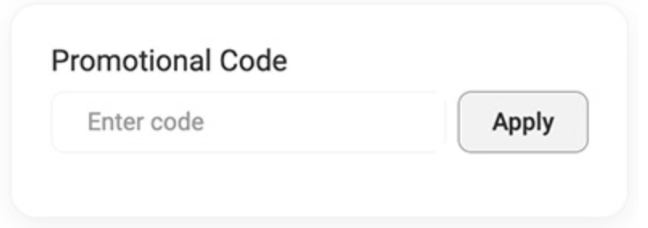
Q: Where can I apply my promo code?
A: You will see a dedicated box to apply your coupon code right when you reach the payment information screen at checkout. It looks like this:
Q: What products offer "Front Adhesive" (inside-the-window) printing?
A: Front adhesive means the sticky side is on the front of your design (perfect for sticking inside a shop window to face outward). You must select this option in the editor before placing your order. It’s available on:
Q: Can I get individual Die-Cut Temporary Tattoos?
A: True die-cutting isn't available for tattoos, but we have the next best thing! Our temporary tattoos are delivered on individual backing sheets. The clear adhesive closely follows your design, and you can easily trim the backing sheet to your exact artwork shape to get that perfect die-cut look. We also offer tattoo singles, which are delivered cut either squared or rectangles.
🚚 SHIPPING & ACCOUNT MANAGEMENT
Q: What's the average shipping time?
A: Production times vary based on your selected material and design complexity. Delivery dates are estimates provided by the couriers and are not guaranteed, but you can always upgrade to our express option at checkout if you're on a tight deadline.
Q: Can I change my address post-shipment?
A: Once an order has physically shipped, we unfortunately cannot change the delivery address.
Q: Where is the tracking number for my Canada Post Standard Shipping order?
A: To keep costs low for you, Canada Post Standard Shipping does not include tracking. This is noted at checkout. If you need step-by-step tracking, make sure to upgrade your shipping method. For items shipped to the U.S., we offer standard and rush shipping via USPS. which includes tracking. Express shipping for the U.S. is via FedEx, and a shipping number will be provided.
Q: Can I pick up my order in person?
A: Yes! If you’re close to our Toronto headquarters, simply type "Pick up" as your street address during checkout, or email us at [email protected] right after ordering to let us know. You can also reach out to us before you place your order so we can waive shipping fees.
Q: Can I reorder a past design, and how do I see my full history?
A: Yes! Reorders are faster to produce because we already have your files saved. To view your history, ensure you are logged into your account:
On desktop: Click your profile icon at the top right, select Order History, and choose "Any and All" from the top dropdown to view everything.
On mobile: Tap the 3 lines (the “hamburger”) at the top right, click your username, then select Order History.
⚠️ IMPORTANT: "ACTION REQUIRED" & ON-HOLD ORDERS
Q: I got an email saying my order is "On Hold." What does that mean?
A: Because our real-life design team checks every file, we occasionally hit a pause button if something won’t print beautifully (like text that is too small/thin, blurry files, or confusing clear backgrounds). If this happens, you’ll receive an email titled: "ACTION REQUIRED - Your StickerYou Order Has Item(s) On-Hold."
Here’s how to fix it:
You MUST register/log into your account. Many customers check out as guests, but to review a hold, you must have a registered account.
Click the link in the email, log in, and you will see exactly why our art team flagged your design.
You will have 18 hours to approve our suggested fix, upload a new file, or ask for an extension (up to 48 hours).
Note: If we don't hear from you before the countdown timer ends, your order will automatically be sent to print as-is to keep it on schedule, and it won't be eligible for a reprint or refund. Don’t worry, you’ll receive a “1-hour left” email as a reminder.
❓Other Concerns
Q: How do I clean up left-over sticker residue?
A: Changed your mind on the placement of your sticker? Standard household items like rubbing alcohol, baby oil, acetone, or a bit of soapy water and elbow grease will clean the surface up in seconds. Learn more about removing stickers here.
Want more inspiration, custom branding tips, or exclusive deals? Follow us on social media or sign up for our newsletter to get the best promos delivered straight to your inbox.
Ready to get your project started? Start creating today!
Follow us
Featured Posts
Packaging & Branding
- Game On: How Small Businesses Can Cash In on Fall & Winter Sports Season
- Gearing Up for the Holidays: How Small Businesses Can Prep Early (and Stand Out)
- Thinking About a Brand Refresh? Here's How to Try It Before You Buy In
- 9 Creative Ways To Use Roll Labels
- Introducing: Image Transfer (DTF) Iron-Ons
Tips & Tricks
- Game On: How Small Businesses Can Cash In on Fall & Winter Sports Season
- Gearing Up for the Holidays: How Small Businesses Can Prep Early (and Stand Out)
- AI Design Tools vs. Human Designers: A Side-by-Side Breakdown
- Why Nonprofit Branding Matters (and How to Do It Affordably)
- How Colleges Are Using Custom Stickers, Labels & Iron-Ons This Back-to-School Season
Customer Spotlight
- Customer Spotlight: Spicing Up Retail Shelves with Rippah Chili Oil 🌶️
- Customer Spotlight: Preserving Indigenous Culture & Language with Creative Cub 🐾
- Customer Spotlight: Keeks Corner | StickerYou
- Customer Spotlight: Juicery Harlem | StickerYou
- Customer Spotlight: Horseshoe Valley Resort Geared Up for Crankworx with StickerYou 🚵♂️
Innovation
- TattooYou 101: Ink Your Entire World
- Our Products’ Durability: Testing and Results
- Benefits of StickerYou for Custom Products
- Permanent Stickers: The Adhesive That Won’t Quit
- 5 Creative Ways Brands are Using Custom Fuzzy Stickers
Guides/Tutorials
- AI Design Tools vs. Human Designers: A Side-by-Side Breakdown
- Why Nonprofit Branding Matters (and How to Do It Affordably)
- How Colleges Are Using Custom Stickers, Labels & Iron-Ons This Back-to-School Season
- Clear Decals vs. Vinyl Graphics: Which is Best for Your Car?
- Custom Sticker Printing FAQs: Everything You Need to Know